 Majal
Majal Drawings
A drawing register with revision control and a supersede workflow, plus bulk multi-page PDF upload that parses number and revision from filenames. PDF is a supported format on purpose; see why not DWG.
The Majal platform is organised around the decisions teams make every day. Explore the capabilities by workstream, then use the walkthroughs or a guided demo to see the records and approvals behind each outcome.
Start with your operation
Majal connects the workflows, but buyers do not need to read every module before finding their own starting point.
BOQs, variations, payment certificates, programmes, drawings, RFIs, site quality, HSE, procurement and BIM.
FacilitiesAsset registers, QR and NFC tags, planned and reactive work, SLAs, spare parts, contractors and customer portals.
PlatformRole-based approvals, bilingual operation, offline field capture, document control, integrations and verified recovery points.
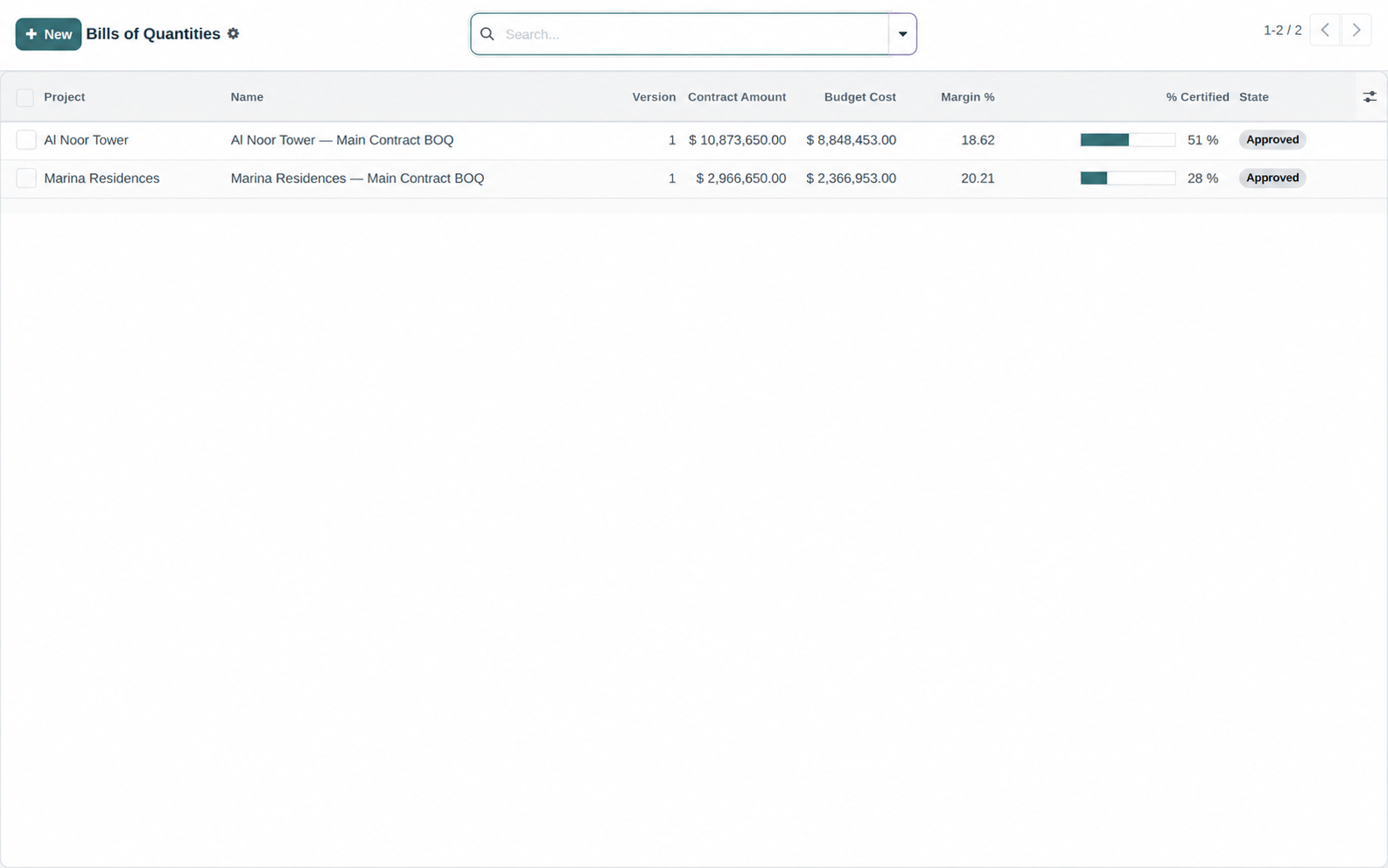
Hierarchical sections and priced lines, each carrying a budget cost breakdown across material, labour, equipment, subcontract and overhead — so totals and margin are derived from a structure somebody can argue with, not a single lump rate. Bills lock on approval and revise by version.
Certify cumulative work done against BOQ lines as a percentage complete, withhold retention as a percentage with a cap, and raise the net customer invoice. The certificate itself prints as a Payment Certificate PDF.
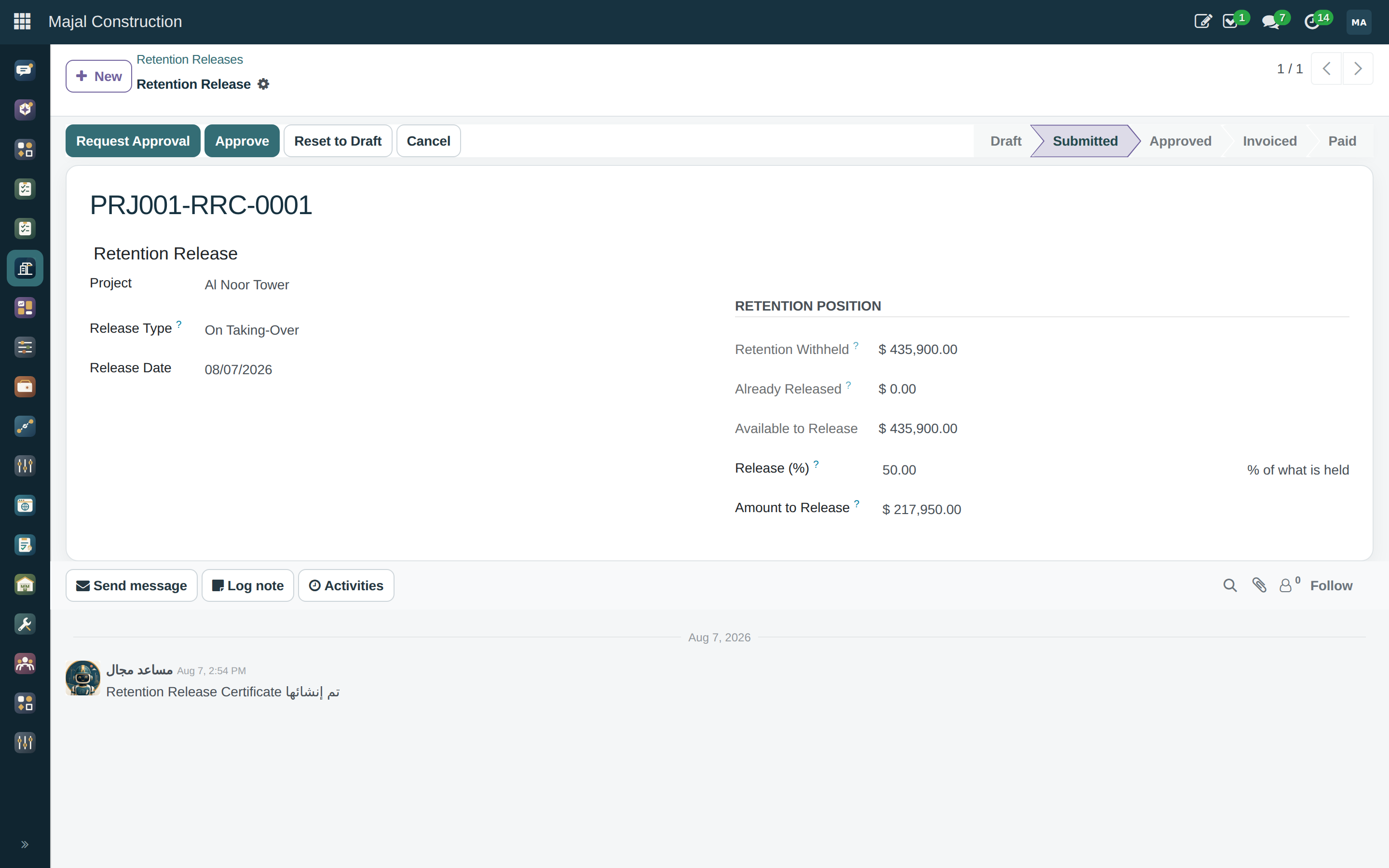
Every certificate above can withhold retention; this is where it comes back. A release certificate draws against what the certificates have actually withheld — not what the contract implies should exist — and recognises the two moments that usually govern it: half on taking-over, the rest at the end of the defects-liability period. A release claimed before its date is flagged, not blocked, because clients and contractors genuinely agree early releases; a release for more than the certificates have withheld is blocked outright, because that one is never a matter of agreement. Prints as a Retention Release Certificate PDF.
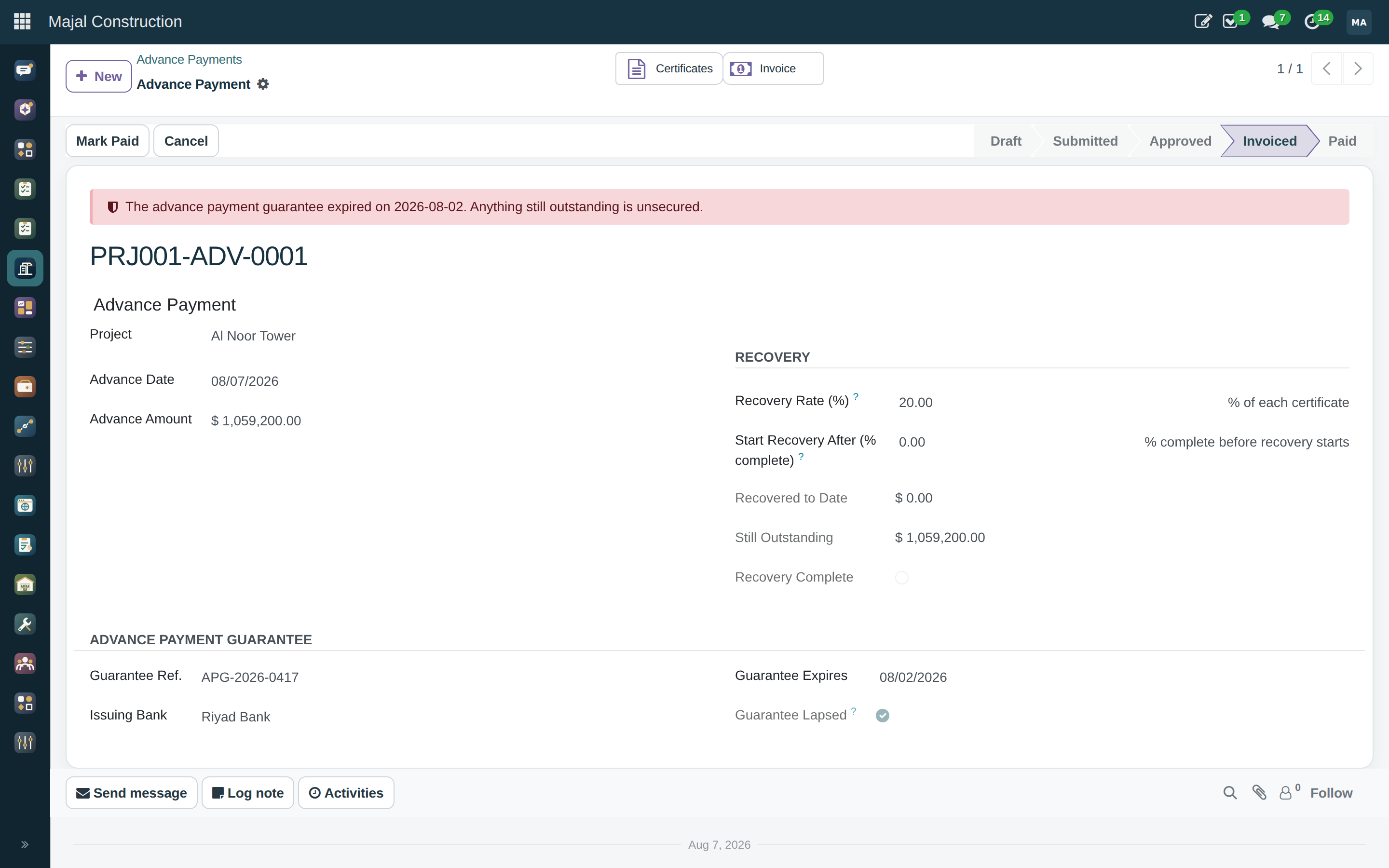
An advance paid against a bank guarantee before work starts, recovered as a percentage of every certificate that follows until the balance reaches zero — and optionally held back from recovery until an agreed share of the contract is complete. The guarantee's expiry is tracked against what is still outstanding: an advance still owed against a guarantee that has lapsed is unsecured, and the certificate says so rather than leaving it for an audit to find. Prints as an Advance Payment Certificate PDF.
A change event — often raised from an RFI or an instruction — becomes a priced variation order. On approval its lines are appended to the bill of quantities, adjusting the contract value even when the bill is locked, and they flow into the next payment certificate. The alternative, a variation tracked in a spreadsheet beside the bill, is how contract value and certified value stop agreeing.
The monthly commercial control: contract value and certified value against budget, committed and incurred cost — giving earned margin, forecast final margin, and the movement against the margin the job was tendered at. Overspend already signed away in subcontracts appears in the forecast rather than surfacing at final account. Prints as a CVR PDF.
Portfolio-level: contract value across live projects, approved variations as a percentage of contract (amber above 10%, red above 20% — a prompt to ask, not a verdict), retention held, and certified-but-not-invoiced. Closed projects drop out, because a board asks about live exposure.
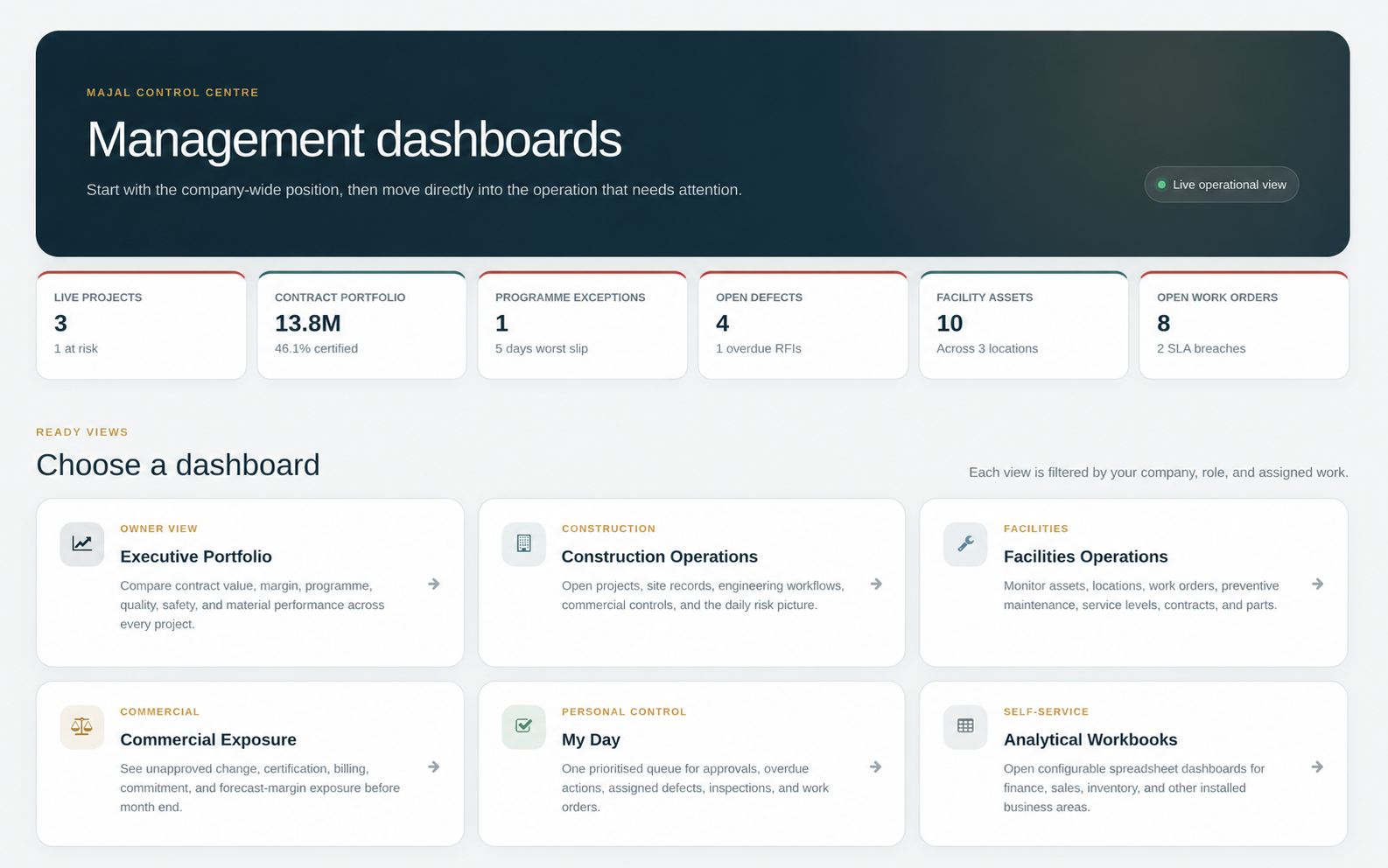
The executive dashboard gathers commercial (CVR), programme (CPM slip), quality, safety (LTIFR) and material figures for every project in one call and compares any selection of them, with a worst-first watchlist. Portfolio rates are re-derived from their components rather than averaged — an average of rates is a different number from the rate, and usually a flattering one.
A drawing register with revision control and a supersede workflow, plus bulk multi-page PDF upload that parses number and revision from filenames. PDF is a supported format on purpose; see why not DWG.
Draft → submitted → answered → closed, with ball-in-court that flips automatically as the document moves, overdue reminders by cron, and references to the drawings the question is about.
A submittal register with revision cycles — Revise & Resubmit spawns
the next revision rather than editing the one that was reviewed — and multi-reviewer
approval chains built on OCA base_tier_validation.
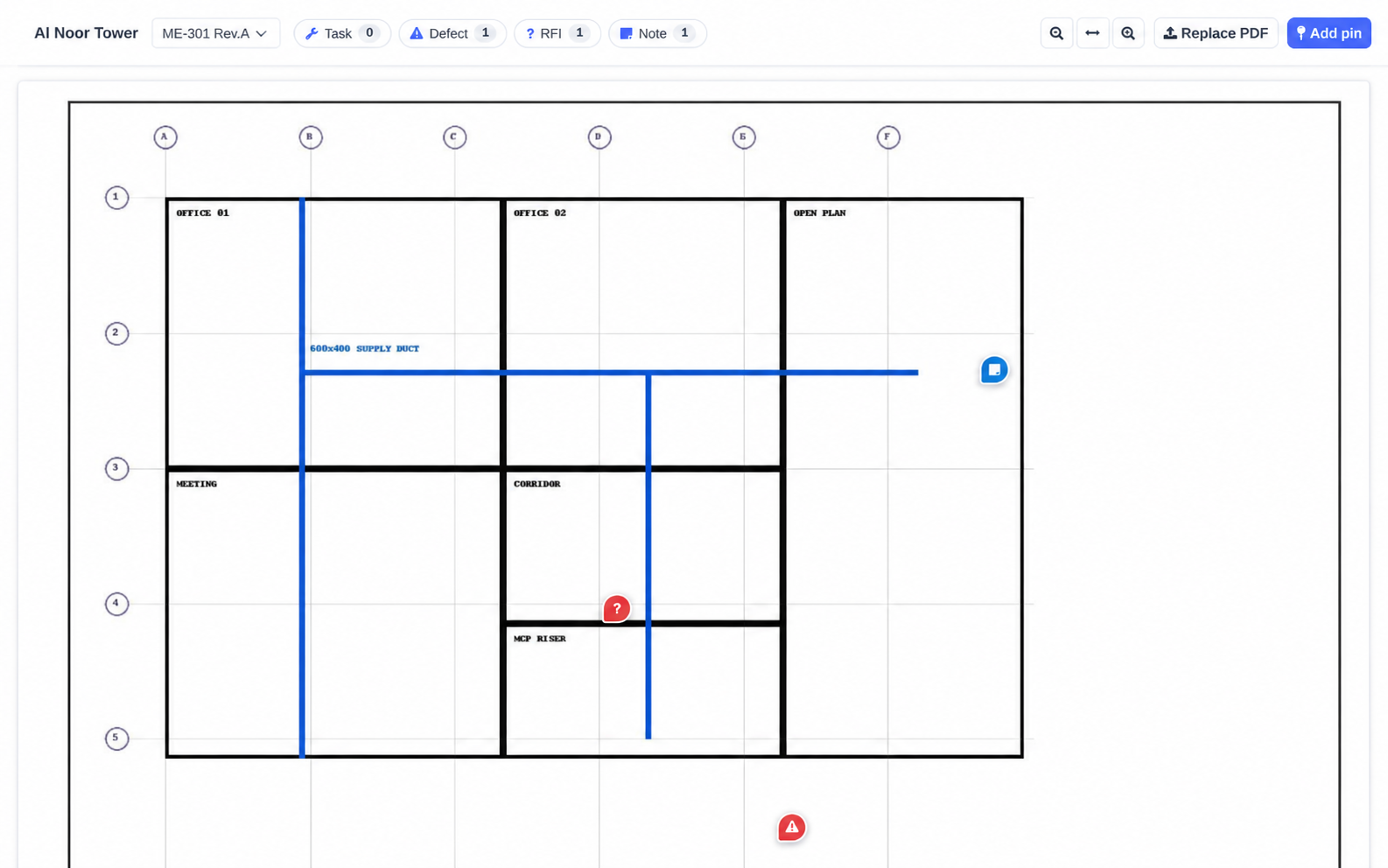
Sheet PDFs render on a canvas with normalised pin coordinates, status colouring, tap-to-open, and three taps from a point on a drawing to a task, RFI, defect or note.
Snagging and defects-liability items, pinnable on drawings, assignable to subcontractors, with severity, kanban and a Punch List PDF. Back-charges on a subcontractor's payment certificate link to the defect that caused them.
No-code checklist and inspection templates, recurring inspections, photo and signature evidence, and PDF field reports. On a small screen the checklist becomes one card per question with radio buttons rather than a table that truncates "Wall finish…" to nothing useful.
A digital site diary: weather, manpower, equipment, activities and delays, with computed totals and a PDF. The labour hours recorded here are what LTIFR is computed from, so the safety statistic has a source rather than an estimate.
Meeting series (progress, site, technical, HSE, client) with attendance, discussion and actions. Open actions carry into the next meeting automatically while keeping the meeting they were first raised at and a carry count — so an item's real age survives the move, and the one nobody is doing stops being invisible.
Sheet PDFs render on a canvas with pin coordinates normalised to the sheet rather than the pixel size of whoever is looking, so a pin dropped on a phone lands in the same place on a desk monitor. Three taps get from a point on a drawing to the task, RFI, defect or note it stands for — the pin is a route into the record, not a sticky note that lives beside it. The same viewer and the same pin model serve facility floor plans through a shared mixin, so a maintenance request pinned on a floor plan and an RFI pinned on a construction drawing are the same mechanism wearing two hats, not two implementations that will eventually drift apart.
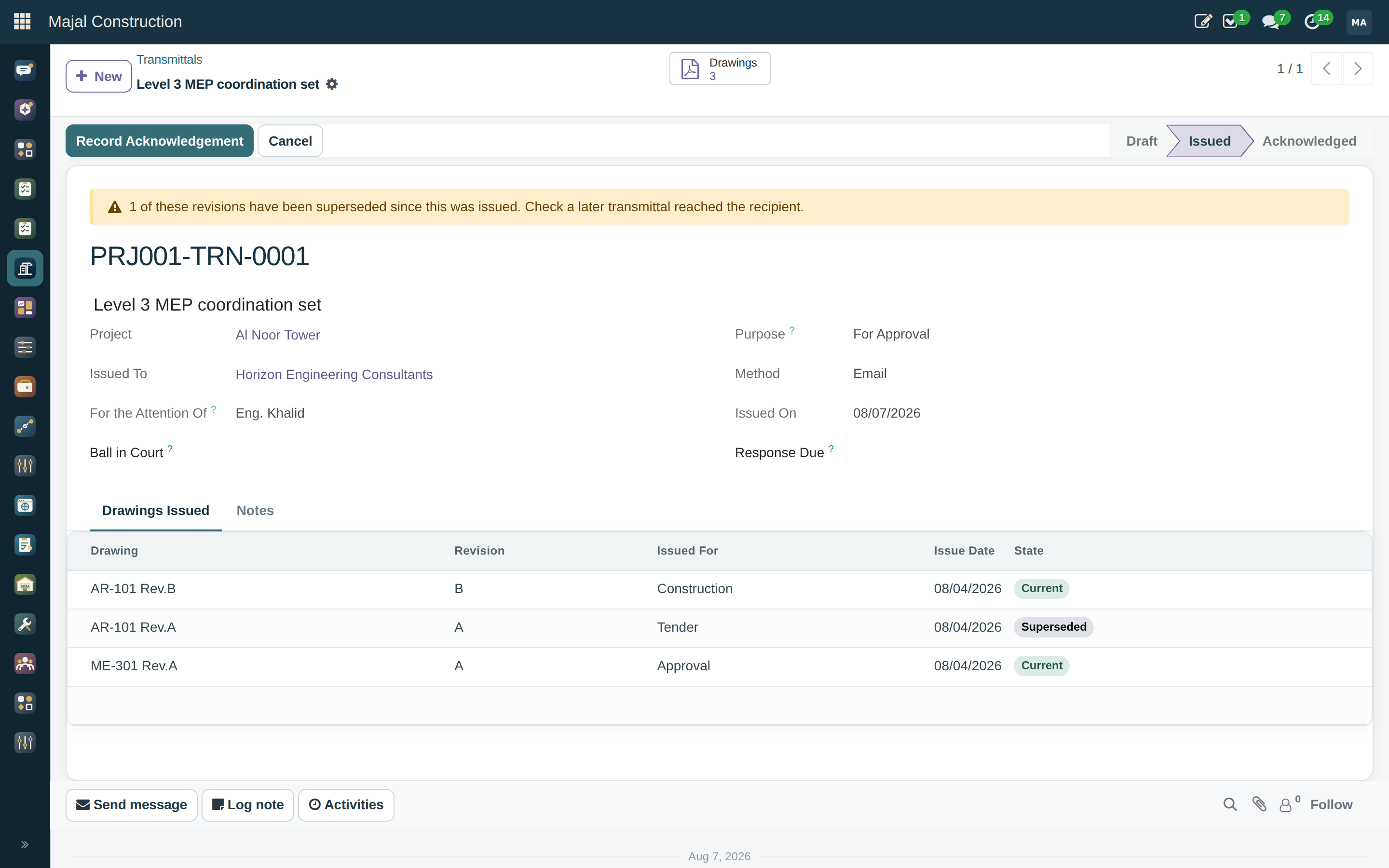
A transmittal is the record that a drawing was actually sent — to whom, for what purpose, and on what date — which is what ISO 19650 asks for and what "we emailed it" is not an answer to. Once issued, a transmittal is immutable: the recipient, the drawings, the purpose and the date cannot be edited afterwards, only superseded by issuing again — because a record that can be quietly corrected after the fact is not evidence of anything. A transmittal also flags when a revision it carried has since been superseded, so it is visible when a recipient may be working from a drawing that is no longer current.
Why immutable A claim that turns on which drawing revision a subcontractor was working to is decided by the transmittal, not by memory. That only holds if the transmittal itself cannot move once it has gone out.
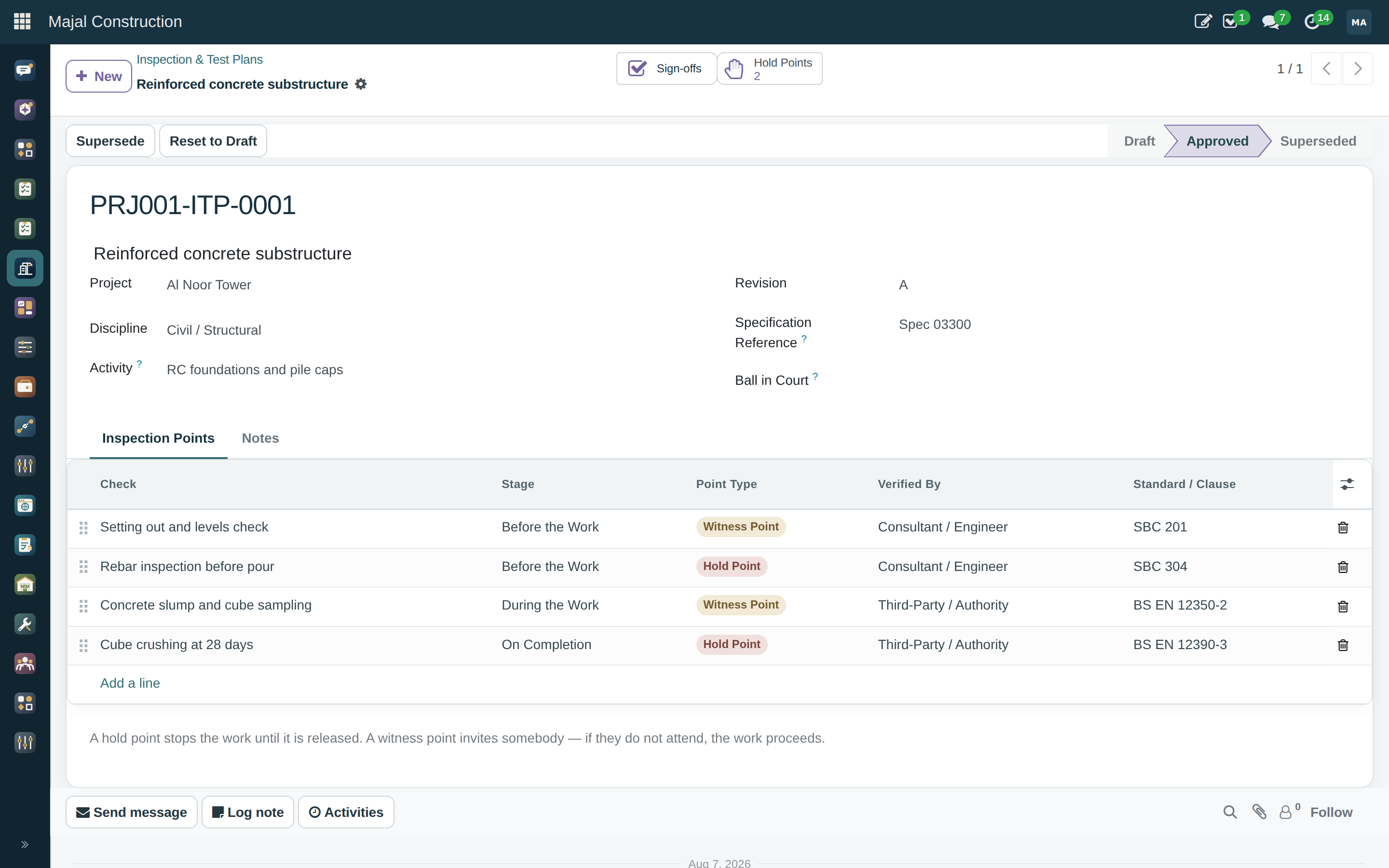
An ITP names the checks a piece of work requires, in order, against a stated acceptance criterion and standard — and the checks come in two kinds that ISO 9001 treats very differently. A hold point stops the work: concrete is not poured until the rebar inspection is signed off, and a pour that goes ahead anyway is the defect nobody can inspect afterwards, because it is inside the slab. A witness point only invites somebody — if they do not attend, the work proceeds and the record shows they were invited. Releasing a hold point needs either the inspection that evidences it, or a recorded waiver naming who authorised proceeding without one.
Waivers are recorded, not hidden Hold points do get waived on real jobs. A system that cannot record that honestly gets worked around instead of used — so a waived hold point still shows exactly who authorised it and why, rather than pretending the point was never there.
A Primavera-style programme rather than a task list: a work breakdown structure,
typed dependencies — finish-to-start, start-to-start, finish-to-finish,
start-to-finish — each with a lag, and a critical path engine that computes early
and late dates, total float and the critical path itself. Baselines record what was
agreed, and variance is measured against them. The Gantt is drawn with OCA
web_timeline.
The programme is also what drives 4D in the BIM viewer. There is no second schedule kept inside the model: a date moved in the Gantt is a date moved in the 4D view, with nothing to re-link and nothing to keep in step.
Permits, logs and inspections are worth nothing in money and matter enormously, so their approval rules match on kind rather than value: hot work and confined space want the safety manager, everything else the project manager.
A tender package pulls its scope from the BOQ, so the budget travels with it. Bidders are invited, and submissions are compared line by line — because a bid with unpriced lines has not offered the whole scope, and bid totals alone hide exactly that. Awarding writes the winning price straight into a subcontract, so it lands in the CVR as committed cost, and marks the other bids unsuccessful. Bid Levelling Sheet PDF.
Subcontracts sit on the BOQ. Subcontractor payment certificates are the payable mirror of the interim payment certificate, with their own retention, and back-charges linked to defects — so the cost of somebody else's snag is deducted with a reference to the snag. Certificates generate vendor bills. Payment Certificate PDF.
Built on a connected stock record rather than a parallel inventory. Each project gets a real stock location. Material issues book stock out of the store into the works against a BOQ item, and waste is recorded as scrap with a reason — offcut, damage, spillage, over-order, loss.
The material position view puts budgeted, consumed, wasted and on-site quantities on one row per product, so over-consumption — the early signal of waste, theft or a mis-measured quantity — is visible against what was priced, while there is still a month left to do something about it. Issue Docket PDF.
A model that can be spun around is a picture. Majal's BIM module exists to make it a record. Every element in an IFC file carries a GlobalId, a 22-character GUID authoring tools promise to keep stable across exports, so an RFI raised against a wall stays attached to that wall through revision after revision. Everything else follows from that one identity.
The IFC STEP form (ISO-10303-21) is read server-side with no third-party library:
elements with their GlobalId, IFC type, name and containing storey; property sets
stored as rows rather than a blob, so "every door with a 60-minute fire rating" is a
query; and quantities stored as columns, so a takeoff totals by read_group
rather than by parsing a thousand JSON documents. Values are kept as text, because
IFC's own typing is inconsistent between authoring tools and coercing it here would
silently lose whichever the model actually said.
Geometry is kept lightweight for a responsive viewer. The customer sees the useful context—storeys, elements, issues, pins and linked records—without needing a separate coordination workspace.
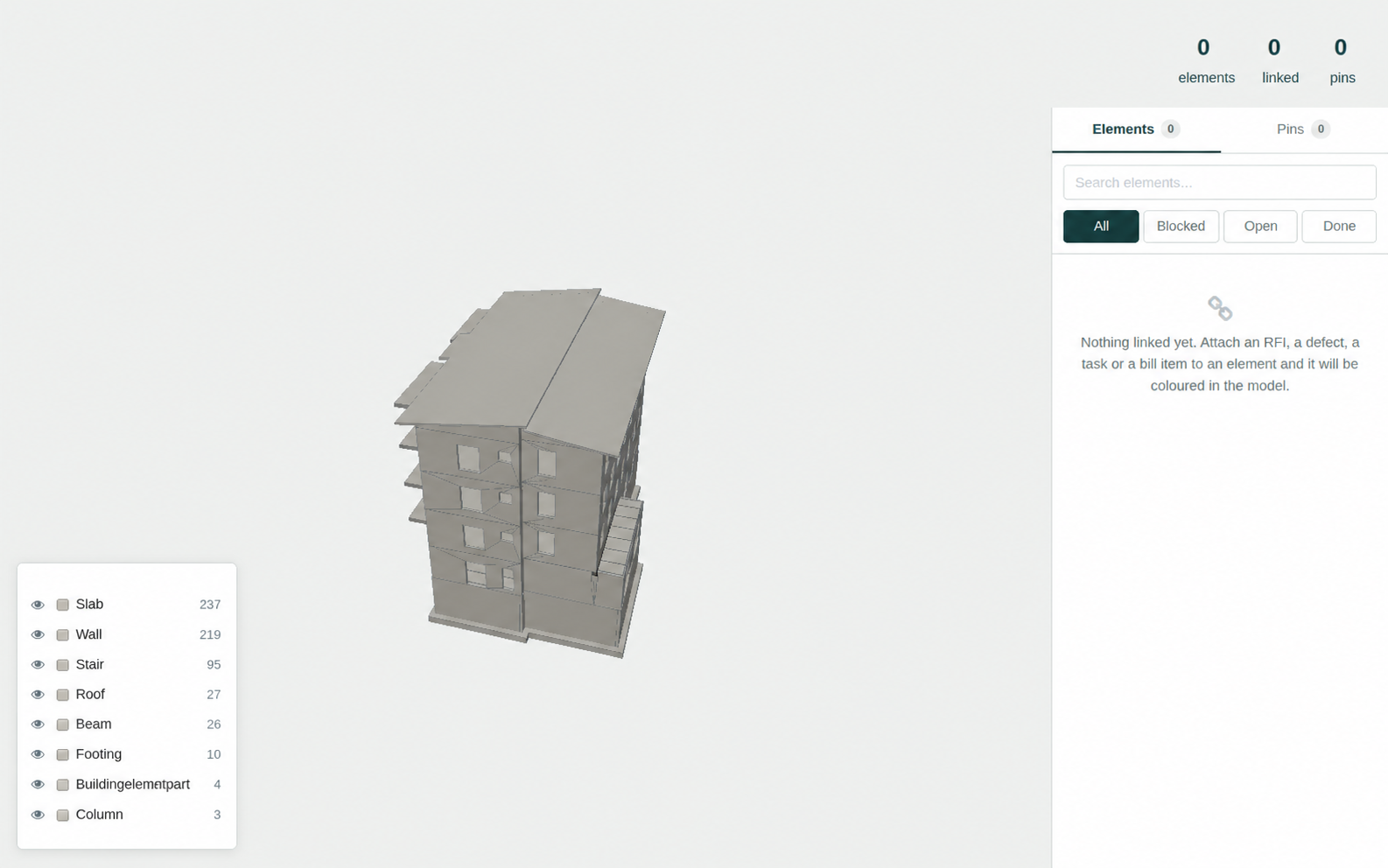
Every BOQ line linked to model elements gains a model quantity and a variance against the billed quantity. Which measure answers a line is taken from its unit of measure — cubic metres to volume, square metres to area — mapped by unit-of-measure category xmlid rather than by category name, which is translated and would stop matching in Arabic. A unit the model cannot measure (hours, lump sum) is left blank rather than guessed, because a wrong default reads as a real variance. A separate quantity takeoff totals the model by type and storey.
A date slider drives element visibility from the dates of the programme tasks elements are linked to. An element with no task is treated as existing throughout, because a model is not a complete programme and hiding everything nobody has scheduled would leave an empty screen on day one.
Issues leave as .bcfzip archives and come back the same way, because the
Issues can be shared with approved design and delivery partners. Topics are matched on
a stable model identity so a revised file updates the issue instead of duplicating it.
A pin stores its viewpoint and selected element, keeping every review conversation
anchored to the same place in the building.
Implemented / not implemented Topics, comments, viewpoints and component selection are implemented. Additional exchange formats and integrations are scoped with the customer during implementation.
Two revisions of the same discipline are differenced on GlobalId: added, removed, renamed, moved storey, changed quantity. Removals that carried an RFI, defect, task or bill item are flagged, because that is the one a design manager has to deal with today. This is an index comparison, not a geometric one — two walls can have identical quantities and sit a metre apart, and this will not notice.
Several models load into one scene, each tinted by discipline and toggled independently. Overlays are for coordination, not record-keeping: pins and links stay with the host model, because "which model is this pin on" has to have one answer.
A clash test names two models and a tolerance, runs in the browser where the geometry is, and records its results in Majal. Elements are bucketed into a uniform grid sized from the median element, because every-element-against-every-element on two ten-thousand-element models is a hundred million comparisons and the browser would simply stop.
The status workflow is the part that matters over weeks. A clash somebody approved as "seen, not a problem" stays approved through every future run — without that, a box-overlap test is unusable by the second week. A clash the latest run no longer finds resolves itself, flagged as closed by the run rather than by a person. A resolved clash that comes back is reopened, because that is news. Pairs are matched irrespective of which model was A. Any clash becomes an RFI with a pin at the intersection point in one click.
| Limitation | What it means in practice |
|---|---|
| Clash testing is bounding-box, not triangle-precise | A duct passing cleanly through a door opening has overlapping boxes and will be reported. Approving it is how you tell the system so. |
| Clash results are capped at 2000 per run | A run finding fifty thousand overlaps has found nothing anybody can act on. The skipped count is kept. |
Units are not read from IfcUnitAssignment |
Quantities are reported in whatever unit the file was written in, and the takeoff will not say which. Check the authoring tool's export settings. Applies to the clash tolerance too. |
| Comparison is by index, not geometry | Identity, storey, name and measured quantity are compared. Position is not. |
| No IFC writing | The module reads models and writes BCF. It never edits or re-exports an IFC file. |
| Large models | Indexing is line-based and cheap but capped at 300 MB per file. The browser viewer is the real limit — split federated towers by discipline. |
| DWG is not supported | The only complete readers are Autodesk's and the Open Design Alliance's, neither redistributable under LGPL-3. A DWG reader that opens a drawing and silently drops layers is worse than none. IFC for models, PDF for drawings — every tool that produces DWG exports both. |
Fourteen modules had each grown their own approve button — a state field and a
groups="…" attribute in a view. Two things were wrong with that, and the
second is serious. A threshold could not be expressed at all: a variation of five
thousand and one of five million took the same single click from the same person. And
the rule was a UI instruction — groups hides a button, it does
not stop the method being called.
A document becomes approvable by inheriting construction.approvable and
answering two questions: what it is worth, and what kind it is. A rule matches a
model, optionally a kind and a project, and a band of value, to a chain of steps. Each
step is a record — which is what makes a single inbox across many document types
possible: "waiting on me" is a query over steps, not a tour of every model.
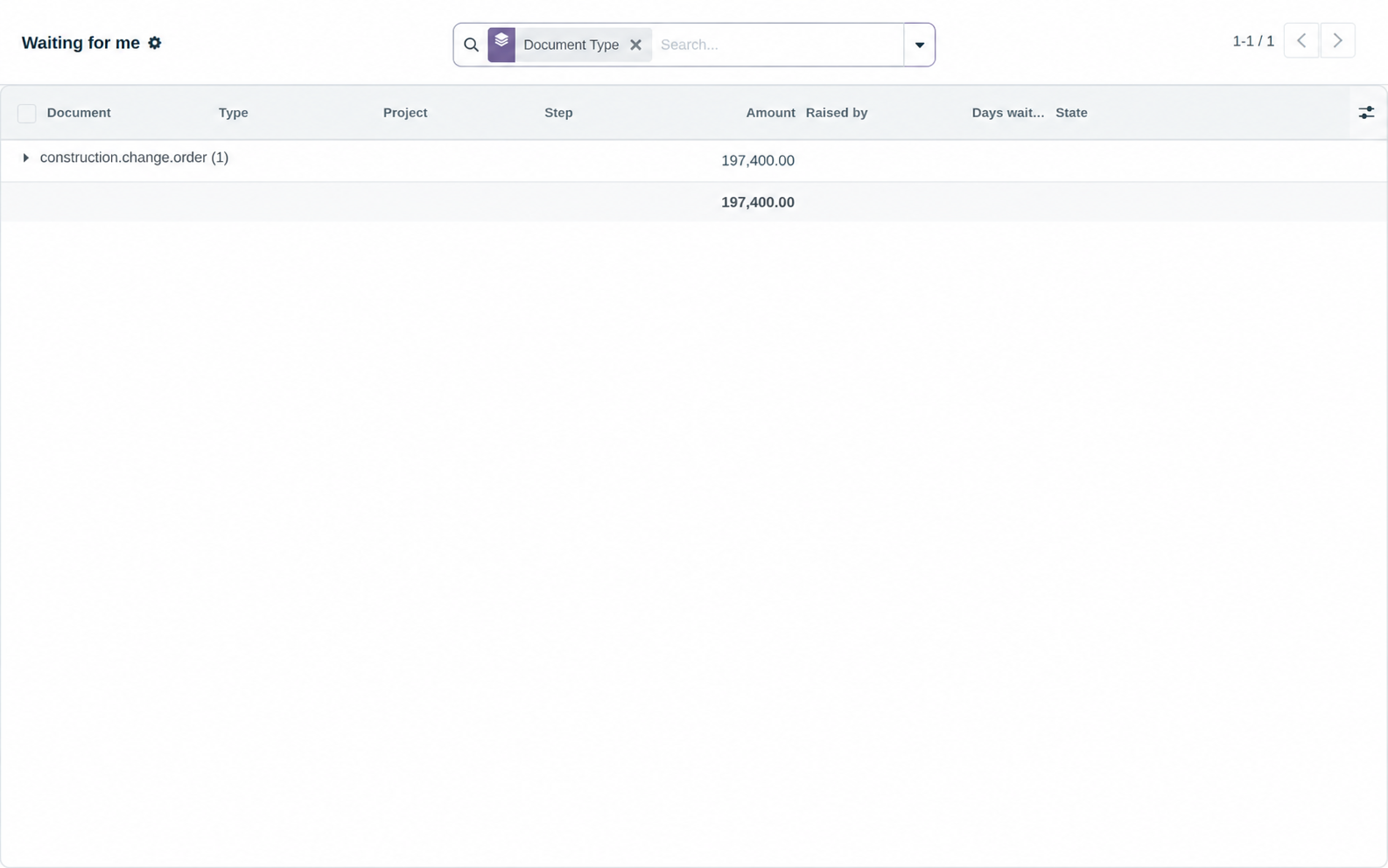
_check_approved() is called from action_approve itself, so the rule holds wherever the call comes from — a button, a script, the RPC console, or a screen nobody has written yet.| Document | Band | Signatures |
|---|---|---|
| Variation | up to 50,000 | Project manager |
| Variation | 50,000 – 250,000 | Project manager, then commercial manager |
| Variation | above 250,000 | Project manager, commercial manager, board |
| Bill of quantities | any | Commercial review, then project manager |
Bands are inclusive at the bottom and exclusive at the top, so 0–50,000 and 50,000–250,000 meet exactly once. A rule naming a project beats a company-wide one, and a rule naming a kind beats one covering every kind — so a job with an unusual delegation of authority gets its own rules without disturbing the others.
| Document | Checked in | Matched on | The last signature |
|---|---|---|---|
| Bill of quantities | action_approve | sell total | approves the bill |
| Variation order | action_approve | absolute sell total | approves the variation |
| Payment certificate | action_certify | value of the period | certifies it |
| Permit to work | action_approve | kind only | issues the permit |
| Daily log | action_approve | kind only | approves the log |
| Inspection | action_approve | kind only | approves the inspection |
Deliberately not in the engine Six models are wired up, not every model — moving another across is a small, explicit piece of work rather than something that happens by accident. A document no rule covers keeps its old behaviour, because a suite that refused to work until rules were written would only get the rules written badly and in a hurry. And there is no approve-by-reply: the WhatsApp alert carries the document and the value and links into an authenticated session, because a token in a message body that approves a quarter-million variation is a signature anybody who sees the phone can forge.
Built around the maintenance and service workflows facilities teams already understand, with one connected record from request to resolution. This is Phase 4 of the roadmap and remains in active development; the modules below are shipping.
A site → building → floor → room location hierarchy, asset parent/child structure, criticality, warranties with an expiry-alert cron, meters and readings, failure codes (problem / cause / remedy), downtime on maintenance requests, and spare-part lists.
Job plans; preventive-maintenance plans that are calendar- or meter-based and generate work orders by cron; a work-order checklist copied from the job plan; and labour, parts and contractor costing on the order.
A policy matrix matched on priority, maintenance type, equipment category and asset criticality — first match wins. Response and resolution clocks both run on a business calendar, so a promise does not burn overnight. On-track / at-risk / breached states, an escalation cron every fifteen minutes, and breach filters and grouping on the work-order list.
Annual maintenance contracts on OCA contract's recurring billing: the
assets covered, the scope (preventive, corrective, parts) and the SLA that was
sold, which outranks the standing matrix for work on covered assets. Work
orders match themselves to their contract as they are raised, so absorbed cost and
recoverable out-of-scope cost stay apart and each contract shows a live margin
against what it has invoiced. PM-visit entitlement is counted on delivery.
Parts held in actual stock locations attached to facility locations and drawn down by work orders. An asset takes parts from the nearest store above it in the hierarchy, so parts cost stops being a number somebody typed and becomes what actually left the shelf. The minimum quantity on the spare list finally means something, and parts consumed on covered work under a contract that excludes them show as recoverable.
A 2D floor-plan PDF per location, with asset, maintenance-request and note pins dropped on it — reusing the same plan viewer as construction drawings through a shared pin mixin, rather than a second implementation that drifts.
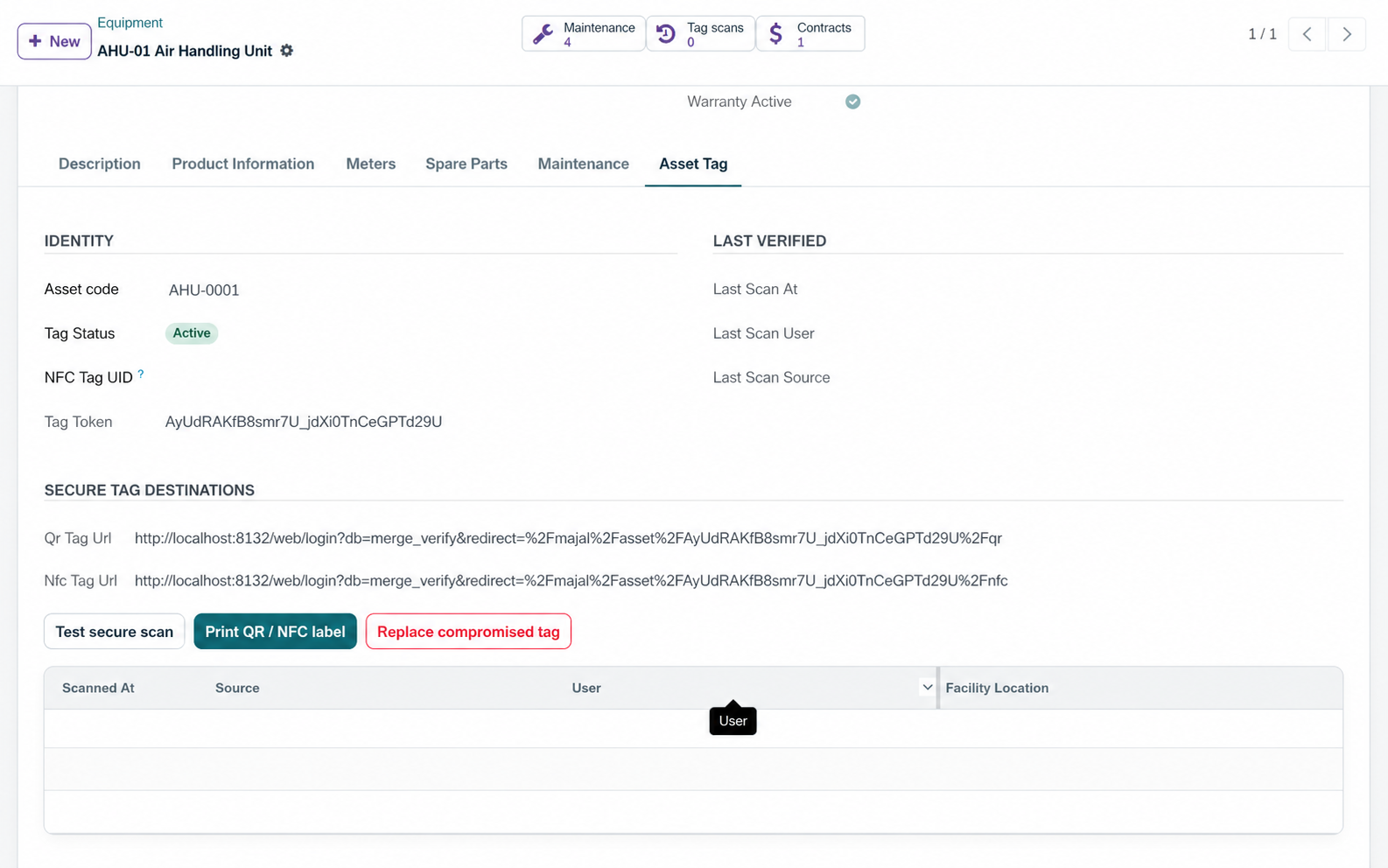
Every facility asset has a human-readable unique code such as
AST-2026-00001, independent QR and NFC destinations protected by an
unguessable token, an active / missing / retired tag state, optional storage of the
physical NFC tag UID, a printable 70 × 50 mm label, an authenticated mobile
landing page, and append-only scan events recording asset, user, time, method and
assigned location. Tokens rotate when a label is lost or copied.
QR and NFC open separate Majal paths so scan history records which was used. The NFC payload is the asset's tag URL encoded as an NFC Forum NDEF URI record. Both tag URLs enter through Majal sign-in with a same-site return path: a new phone selects the locked database, signs in, and then continues to the asset — without exposing the database manager or bypassing record permissions.
| Need | Carrier | Why |
|---|---|---|
| Fixed plant, rooms, panels, fire equipment | QR + NFC on one label | Any phone can scan QR; technicians get faster tap-to-open with NFC |
| Tools and returnable equipment, one at a time | Durable QR/NFC | Low cost and deliberate custody confirmation |
| Hundreds of items moving through gates | UHF RFID | Bulk reads without line of sight; NFC is intentionally short range |
| Vehicles and high-value mobile plant | BLE / GPS / cellular | Continuous or proximity location rather than manual scan events |
| Materials and batches shared with suppliers | GS1 QR / DataMatrix or RFID | Interoperable identifiers and EPCIS event exchange |
Majal's scan-event model is intentionally shaped to be compatible with GS1's EPCIS what, when, where and why, and with GS1 Digital Link identifiers, so assets can later be connected to supplier and owner information without reprinting the code. UHF RFID, BLE and GS1 event exchange are carrier choices for your estate — Majal implements the QR and NFC paths described above.
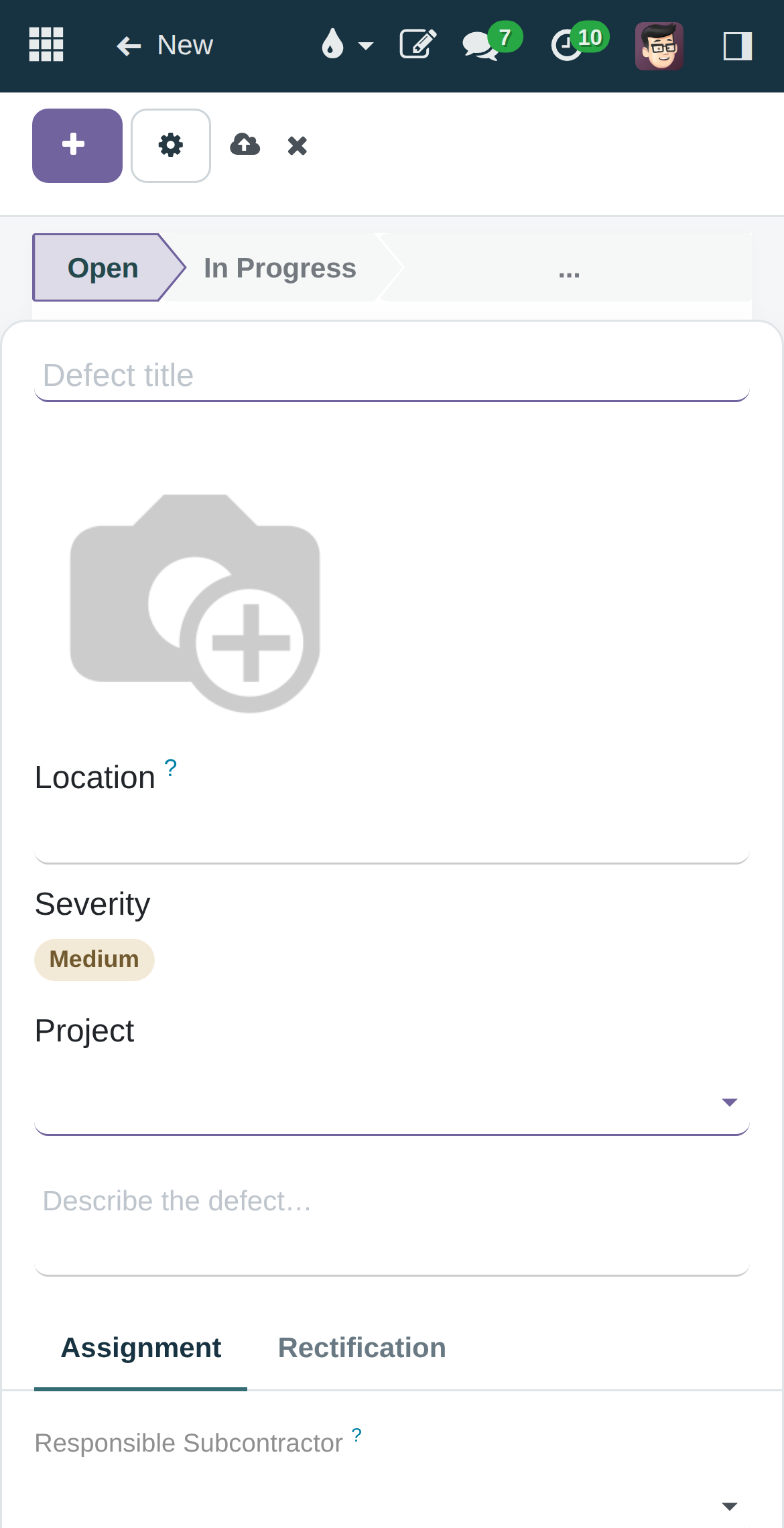
Measured in Chromium at a 390 × 664 viewport against a running instance, not inferred: the backend home, defect list, inspection form and portal all fit without horizontal overflow, and inspection form fields stack one per row. The app is installable to a home screen today — Majal ships its own manifest and service worker them with its own name, colours, icons and a start URL on the construction workspace rather than a generic backend root.
Installable is not the same as offline, and Majal defines safe offline boundaries
one page. Majal Field is a dedicated field PWA that stores only the current signed-in
user's field pack, with per-user device storage, idempotent synchronisation and
visible write_date conflicts. Opening it as another user purges the
previous user's local database and cache from that browser.
In airplane mode: assigned records and previously saved drawings remain available, safe actions enter a local sync queue, going online triggers synchronisation, applied operations disappear from the queue, and conflicts and rejected operations remain visible for review. Clear this device removes cached records and unsynchronised changes.
The boundary is the point Only safe draft, checklist and scan actions work offline. Approvals, financial posting, deletions and BIM stay online. A queued approval is a signature nobody can date, and a queued posting is a ledger entry that may already be wrong by the time it lands. The full argument →
Worth stating separately, because it is the part most likely to disappoint. web-ifc is a 6 MB WASM download before the model itself, and parsing happens on the device. Pinch and pan work, and a single-discipline model of one floor is fine on a modern handset. A federated whole-tower model is not, and no front-end work changes that — it would need server-side geometry tiling, which is a project in its own right. On a phone, treat the viewer as "look at this level"; coordination happens at a desk.
Operational alerts over Meta's WhatsApp Cloud API — permits about to expire, SLAs at risk or breached, RFIs landing in someone's court, defects assigned to a subcontractor, meeting actions carried too many times. They are queued by the events that cause them and sent by cron, so a slow API never blocks a save. Delivery receipts and replies come back through a webhook and land on the document they were about.
Client-branded English and Arabic document templates with sanitised rich-text editing. Submitting for approval creates an immutable HTML attachment and a SHA-256; a different named approver approves that exact revision; and issuing is allowed only while the approved checksum still equals the current immutable revision. Changing a company logo or address affects new rendering but does not alter the checksum or stored content of an approved revision.
Structured sheets cover BOQs, estimates, budgets, valuations, schedules and registers: quantity × unit rate per line, Freeze Revision recording the canonical SHA-256 and preventing edits, a manager-only Start New Revision, and CSV export with a UTF-8 BOM for Arabic and formula-like text prefixed to prevent spreadsheet formula injection.
Said explicitly The optional company approval mark is an internal visual mark. It is not a qualified electronic signature, and the documentation separates the two rather than letting a client assume. The structured-sheet editor is deliberately structured and auditable; it is not a lossless arbitrary XLSX or DOCX editor.
Construction portal — controlled portal accounts for subcontractors, clients and consultants: self-service RFIs with ball-in-court, assigned defects with a ready for inspection action, and subcontracts with their payment certificates. Record rules scope every page to the user's own company.
Facilities portal — occupants report a fault against a piece of equipment and follow its stage and SLA dates without a back-office login.
Portal users stay on portal routes and must never receive internal-user groups; that is a stated rule in the security baseline, not an implementation detail.
Arabic translations ship with the modules and the database is initialised with the Arabic locale in the documented install. RTL is handled deliberately in the interface layer rather than left to the browser's default mirroring. It also shows up in small engineering decisions: BIM unit-of-measure categories are matched by xmlid rather than by translated name, precisely so quantity matching does not stop working in Arabic; and CSV exports carry a UTF-8 BOM so Arabic opens correctly in a spreadsheet.
Six Majal roles — Platform Owner, Company Administrator, Operations Manager, Project/Facility Manager, Engineer/Supervisor, Field User/Technician — replace the raw clear capability tiers, each scopeable to Construction, Facilities, or both. Twelve audited optional capability tiers add Procurement, Inventory, Finance, HR, Website and AI administration; one tier per family; each with a minimum role; and high-risk Finance, HR and Website administration requires Platform Owner approval.
Enforced on the server: a Company Administrator cannot grant Company Administrator or Platform Owner; no administrator can change an account at or above their own rank; users cannot deactivate themselves; the last active Platform Owner cannot be deactivated; client administrators cannot bypass role boundaries; and access and activation changes land in an immutable administration audit. HR packs are explicitly isolated from Facilities administration, because the upstream HR role normally implies Maintenance Administrator.
A daily job keeps seven curated archive slots — today, yesterday, the day before,
weekly, two-weekly, monthly and quarterly checkpoints. Each ZIP holds a
transaction-consistent dump.sql, the filestore/ with every
uploaded drawing, photo and attachment, and a manifest.json recording
platform, PostgreSQL and installed-module versions — with a SHA-256 stored in Majal
and checked again before download or restore.
Restore is two-step by design, because a live web process must never be able to replace its own database: a Platform Owner prepares a restore and gets a one-time code that expires in two hours, and a deployment operator runs the script offline. The script validates code, expiry, path, checksum and ZIP contents, restores into a replacement database, restores the filestore, validates the installed-module table, and rolls the original database and filestore back automatically if validation fails.
Not a whole DR strategy Seven local points are fast operational rollback. Off-site encrypted copies, immutability against application credentials, monitoring, client-specific RPO/RTO and a rehearsed quarterly restore drill are all documented as things a deployer must add. Why the distinction matters →
Majal uses a maintained authentication and authorisation foundation; it does not implement a second password or session system. The shipped profile locks the database selector to one database, disables database listing and the browser database manager, runs the web application as a PostgreSQL role with no superuser, database-creation or role-creation privileges, and installs Majal's password policy, passkey and TOTP / email-MFA modules with a 12-character minimum. The documentation is explicit that email-based 2FA must not be enforced before mail delivery is verified, because doing so can lock out every user.
A permission-aware bilingual copilot that searches through the current user's environment, so normal access controls and record rules stay active. Local Ollama is the free default; Kimi, OpenAI, Gemini and Claude are company-managed bring-your-own-key options behind one provider-neutral gateway, with keys encrypted at rest and never returned to the browser. Conversations are private to their owner, usage is audited and limited per user and company, provider endpoints are fixed so the server cannot be turned into an outbound proxy, and operational records are treated as untrusted prompt content.
Deliberately read-only The first release can summarise and recommend. It cannot approve, sign, pay, close, delete or modify operational records, and every answer is labelled as generated material.
Majal capabilities are assembled into clear workstreams so customer teams can focus on outcomes rather than a technical module catalogue.
| Workstream | What teams can do | Business outcome |
|---|---|---|
| Construction delivery | Projects, BOQs, drawings, RFIs, quality, safety, approvals and programme control | Confident delivery and handover |
| Commercial control | BOQs, payment certificates, variations, retention and exposure | Protect margin and cash |
| Building information | Models, drawings, revisions, pins, issues and approvals | Traceable coordination |
construction_rfi | RFIs with ball-in-court and overdue reminders | LGPL-3 |
construction_submittal | Submittal register with revision cycles and tier-validated review | LGPL-3 |
construction_pin | Pins on drawing sheets with the OWL plan viewer | LGPL-3 |
construction_planning | WBS, typed dependencies, CPM engine, baselines, Gantt | LGPL-3 |
construction_defect | Punch lists and DLP defects, pinnable and assignable | LGPL-3 |
construction_daily_log | Digital site diary with computed totals and PDF | LGPL-3 |
construction_form | No-code checklists, recurring inspections, PDF field reports, ITPs with hold points | LGPL-3 |
construction_progress_billing | Interim payment certificates, retention release, advance payment and recovery | LGPL-3 |
construction_change_order | Change events and variation orders that adjust the BOQ | LGPL-3 |
construction_subcontractor | Subcontracts, subcontractor certificates, defect-linked back-charges | LGPL-3 |
construction_tender | Tender packages, bid invitations, line-by-line levelling | LGPL-3 |
construction_material | Site stores, material issues, waste as scrap with a reason | LGPL-3 |
construction_report | Cost Value Reconciliation and Commercial Exposure | LGPL-3 |
construction_dashboard | Executive portfolio and project comparison | LGPL-3 |
construction_hse | Permits to work, incidents, toolbox talks, LTIFR | LGPL-3 |
construction_meeting | Meetings and minutes with carried actions and carry count | LGPL-3 |
construction_bim | IFC index, 3D viewer, 4D, BCF, comparison, federation, clash | LGPL-3 |
construction_whatsapp | Operational alerts over Meta's WhatsApp Cloud API | LGPL-3 |
construction_portal | Free portal for subcontractors, clients and consultants | LGPL-3 |
construction_ui | Majal workspaces, command centre, live KPIs, My Day | LGPL-3 |
facility_asset | CAFM asset registry, locations, meters, failure codes | LGPL-3 |
facility_workorder | Job plans, PM generation, work-order costing | LGPL-3 |
facility_sla | Response and resolution SLAs on a business calendar | LGPL-3 |
facility_contract | Annual maintenance contracts, cover, contract SLA, margin | AGPL-3 |
facility_inventory | Spare parts in real stores, consumed against work orders | AGPL-3 |
facility_portal | Occupant service requests and contractor visibility | LGPL-3 |
facility_floorplan | Asset, request and note pins on 2D floor plans | LGPL-3 |
majal_administration | Client access roles, capability packs, verified recovery points | LGPL-3 |
majal_security | Password policy, passkeys, configurable MFA | LGPL-3 |
majal_documents | Versioned branded documents and structured sheets | LGPL-3 |
majal_field_offline | Bounded offline field workspace with conflict-safe sync | LGPL-3 |
majal_ai | Majal Intelligence — bilingual, permission-aware, read-only copilot | LGPL-3 |
majal_branding | Majal identity, product information, PWA manifest and icons | LGPL-3 |
majal_workforce | Allocate people to projects and facility locations, with a projected-availability calendar | LGPL-3 |
majal_demo | Opt-in two-company acceptance dataset and role personas — demo/QA databases only | LGPL-3 |
Financial control, budgets, recurring payments and customer follow-ups are part of the connected commercial workspace. Learn how Majal is delivered →